Zintego - Invoice Maker
- 4.6
- Rating
- 100.00K
- Installs
- Free
- Price

 Analysis by App-foxy
I found Zintego - Invoice Maker most useful when I needed to create a clean invoice without opening a full accounting suite. It is a free business app from Monster Brain Studios Limited, aimed at freelancers, small service providers, and anyone who occasionally needs to bill a customer from an Android phone. My overall impression is that it keeps the central task approachable: enter the customer and service details, prepare the invoice, then use the finished document in the way that suits your workflow.
That simplicity is the main reason I would recommend trying it. Many invoicing tools begin by asking you to understand a whole business system, while this app focuses more directly on producing an invoice. At the same time, I would not treat it as a complete replacement for bookkeeping software. Its strongest role is as a practical invoice-making companion, especially when speed matters more than advanced financial administration.
How Zintego fits into everyday invoicing
The app sits in the business category, but it feels designed for ordinary working situations rather than large finance departments. Imagine finishing a small repair job, a design task, a tutoring session, or a home service visit and realizing that the customer needs a formal bill before the end of the day. Instead of waiting until you reach a computer, you can use a phone-based workflow and keep the paperwork moving while the details are still fresh.
You May Also Like

 Blood Strike: 2.5 Anniversary
Blood Strike’s Loadouts Turn Every Drop Into a Tactical Gamble
A close look at Blood Strike’s custom loadouts: how fast access to signature weapons reshapes its battle royale rhythm, rewards preparation, and narrows the gap between fights.

 Pandora - Music & Podcasts
Pandora’s Music Is Easy to Start, but Harder to Recover
Pandora’s strength is its low-effort path from a seed to a station. Its weak spot is how much confidence it asks you to place in connection, setup, and quiet recovery.

 8 Ball Pool
8 Ball Pool Is Built on Rivalries, Rematches, and Routine
A close look at the rivalries, rematches, shared routines, and unanswered safety questions that turn a quick pool match into a persistent mobile community.

 Samsung Music
Samsung Music’s Quiet Strength Is Playing What You Already Own
Its reach comes less from spectacle than from dependable access to a personal library. That simplicity is both the app’s strongest retention engine and its ceiling.

 AccuWeather: Weather Radar
AccuWeather Review: A Quick, Clear Forecast for Everyday Decisions
For everyday plans, the best forecast is the one you can understand quickly. AccuWeather makes rain timing, radar, and local conditions easy to act on, with a few trade-offs.

 Hill Climb Racing
Why Hill Climb Racing Still Turns Crashes Into One More Run
A tiny car, a bumpy hill and one more upgrade: Hill Climb Racing keeps resurfacing because its simple chaos makes every near-miss feel personal.
More From Our News Desk



I like this approach because invoice creation is often interrupted by real life. You may be standing at a customer’s location, traveling between appointments, or trying to send a document before a client loses patience. A focused mobile tool can be more useful in those moments than a feature-heavy desktop package that requires more setup.
The store summary presents it as an easy and simple invoice maker, and that description matches the app’s intended appeal better than a promise of complete business management would. You should approach it as a document-preparation tool first. If you want deep expense tracking, tax reporting, inventory control, payment reconciliation, or a full customer relationship system, you may eventually need another product beside it.
The people most likely to benefit
I would put independent tradespeople, consultants, tutors, photographers, cleaners, repair workers, and small online sellers near the front of the target audience. These users often need invoices regularly but do not necessarily want to maintain a complicated accounting environment. The app can also make sense for a side business where billing is important but not frequent enough to justify a larger subscription-based platform.
It is also suitable for someone who is starting to formalize their work. A consistent invoice is easier for a customer to understand than a casual message listing a total. Using a dedicated app encourages you to separate the work performed, the amount due, and the customer information instead of sending an improvised note every time.
I would be more cautious about recommending it to a growing company with several staff members or a bookkeeper who needs shared records. Those situations usually depend on collaboration, audit trails, recurring billing, and connections to other financial systems. A mobile invoice maker may still help with quick documents, but it should not be mistaken for a multi-user accounting platform.
What the current release tells me
The current version is 1.6.1, and the app has been available since September 2022. That history matters because it suggests this is not a brand-new experiment that has just appeared in an app store. It has had time to establish a recognizable purpose, and the listing shows an average rating of 4.6 from around 1.6 thousand ratings. More than 100 thousand installs also indicate that it has reached a meaningful audience of mobile users.
Those figures do not guarantee that every workflow will suit every business, but they make the app easier to take seriously than an untested invoice utility. I also appreciate that the current release is compatible with Android 6.0 and later, which keeps it accessible to people using older phones. That can be particularly relevant for a small business that does not replace devices often.
The age rating is Everyone, which fits the practical nature of the app. There is no reason to expect a business invoice tool to be aimed at a narrow age group, although younger users operating a real business would still need to follow their local invoicing and tax obligations. The app can help prepare a document; it does not remove the responsibility of checking whether the document meets the rules that apply to you.
Changes and product maturity
Because the current release is identified clearly, I would install it rather than rely on an old copy or assume that screenshots from an earlier period represent the app perfectly. Version changes can affect the arrangement of fields, the way documents are handled, or the smoothness of the workflow. Even when the central idea remains the same, small interface adjustments can change how quickly you can finish an invoice.
What I can say with confidence is that the product has moved beyond the earliest stage of its life and is still presented as a focused invoice solution. I would not read the version number as proof that it includes every advanced feature found in mature accounting products. Instead, I see it as a sign to evaluate the current build on its own merits and to keep an eye on future updates if your business depends on it every week.
For existing users, the practical lesson is simple: before an important customer appointment, open the current installation and check that your usual invoice routine still feels familiar. If you have saved templates, customer details, or preferred wording, it is sensible to review a sample document before sending a real one after an update. That is not a criticism unique to this app; it is a good habit for any tool used to create financial documents.
A realistic workflow for a small service business
Here is the kind of situation where I think the app makes the most sense. Suppose I run a mobile bicycle repair service and complete two different jobs for the same customer in one week. At the second visit, I need to bill for labor and replacement parts, but I do not want to reconstruct the first job from memory or search through scattered messages.
I would prepare the invoice while the work details are available, separating the labor from the parts and checking the customer information before finalizing it. The useful habit here is to treat the invoice as a record of the work, not merely as a total. Clear line descriptions reduce questions later, especially when a customer remembers the service but not every item involved.
A second useful habit is to review the document as if I were the recipient. Is the business identity obvious? Can the customer see what was supplied? Is the amount easy to locate? Is the wording professional without being unnecessarily complicated? A simple invoice app does not replace judgment, and this final review is often more valuable than adding decorative formatting.
For occasional billing, I would prepare the invoice soon after the job and keep a separate routine for confirming whether payment arrived. That separation is important. Creating an invoice and tracking a payment are related tasks, but they are not automatically the same task. Users who need a complete receivables dashboard should compare this app with accounting software rather than expecting the invoice document itself to manage the entire process.
Small workflow details that make a difference
One non-obvious advantage of a mobile invoice tool is that it can reduce the gap between completing work and documenting it. When billing is postponed until the weekend, details become vague and small jobs are easy to forget. Preparing the document close to the appointment can improve accuracy even if the app itself does not change your business process.
Another useful approach is to create a personal wording standard before using the app repeatedly. Decide how you describe labor, materials, travel, revisions, or deposits, then keep those descriptions consistent. This makes invoices easier to scan and helps customers compare one bill with another. The app provides the place to create the document, but consistency comes from the way you use it.
I would also avoid treating the first completed invoice as a finished system. Make a test document and inspect every visible detail before sending anything to a customer. Check names, dates, quantities, totals, and any terms you include. This is especially important for a new user because a fast interface can encourage fast approval, while financial documents deserve a deliberate final check.
A further trade-off is portability. Preparing an invoice on a phone is convenient, but a small screen can make long descriptions or detailed reviews less comfortable than on a laptop. For short, straightforward bills, that is rarely a problem. For complex invoices with many items, I would prefer a larger screen or a dedicated accounting service if one is already part of the business setup.
Where it compares well with usual alternatives
The usual alternatives fall into two broad groups: manually designed documents and full accounting platforms. Compared with a blank word-processing document or spreadsheet, a dedicated invoice maker should reduce the temptation to rebuild the layout every time. That can save effort and make the result more consistent, particularly for someone who does not enjoy formatting documents.
Compared with a full accounting platform, the appeal is the narrower focus. You are less likely to be distracted by reports, ledgers, inventory screens, or business settings when your immediate need is simply to prepare an invoice. For a solo worker, that lighter approach can feel more comfortable and less intimidating.
The compromise is depth. A spreadsheet can be customized extensively if you are willing to maintain it carefully, while accounting software usually offers broader tracking and reporting. Zintego is most convincing in the middle: more purpose-built than an improvised document, but less ambitious than a complete financial management system.
I would choose a full accounting product when invoices are only one part of a larger process involving tax preparation, bank reconciliation, payroll, inventory, or multiple people. I would choose a manual document when I create invoices so rarely that installing and learning an app offers no real benefit. Between those extremes, this app has a sensible place.
Costs, expectations, and practical limits
The app is free to install, but it includes in-app purchases ranging from $6.99 to $199.99 per item. That wide range is a reason to look carefully at the purchase screen before committing to anything. A free download is useful for evaluating the workflow, but it should not automatically be interpreted as unlimited access to every possible capability.
My advice is to decide what you actually need before paying. If you only prepare occasional invoices, a large purchase may not make sense. If the app becomes part of your daily business routine, then the value depends on whether the paid options remove a real obstacle rather than simply adding features you will never use. The right question is not whether the app can do more, but whether the extra capability saves enough time or reduces enough friction for your specific work.
Users should also remember that invoice requirements vary by country and business type. Before sending a document, I would check whether your local rules require particular business identifiers, tax details, numbering conventions, payment terms, or wording. A convenient app can help organize information, but it cannot decide which legal details apply to your situation.
Privacy and record-keeping deserve practical attention too. I would avoid relying on one mobile app as the only place where important billing history exists. Keep your own organized business records and make sure you can locate copies of invoices when you need them. This recommendation is particularly important for anyone moving from occasional side work toward regular commercial activity.
Who should skip it
I would skip this app if my main requirement were a complete business control center rather than invoice preparation. A company with several employees, complicated tax arrangements, recurring contracts, or a large catalog of products may quickly outgrow a focused mobile workflow. In that case, an established accounting platform with broader reporting and collaboration tools would be the safer starting point.
I would also hesitate if I needed a highly specialized invoice format and could not spend time checking the final result. The more unusual the billing requirements, the more important it becomes to confirm that every required field and presentation detail is handled correctly. A general-purpose invoice maker may be perfectly adequate for ordinary service billing but less suitable for tightly regulated or complex commercial documents.
Finally, people who dislike managing records outside the invoice itself should be careful. Sending a bill is only one step in being paid. You still need a reliable method for following up, recording payments, handling corrections, and keeping your financial history organized. If you want all of that in one connected system, compare alternatives before making this app the center of your business process.
What I would watch in future use
For the next stage of the product, I would pay attention to how well it continues to balance simplicity with the needs of returning users. New customers benefit from a clear first invoice, but established users care about speed, consistency, and confidence that their routine will remain dependable. Improvements that reduce repeated entry or make document review easier would matter more to me than visual changes alone.
I would also watch how the app handles the boundary between creating an invoice and managing the business around it. There is a point where adding more tools makes an app more useful, and another point where extra complexity undermines its original appeal. The best direction would preserve the quick mobile experience while giving regular users enough control to avoid rebuilding the same information repeatedly.
For now, my judgment is straightforward. Zintego - Invoice Maker is worth considering if I need a focused way to prepare business invoices from an Android device and I prefer a lighter workflow than a full accounting package. Its free entry point, broad device compatibility, and established user base make it approachable. I would still test the complete process with a sample invoice, review any in-app purchase carefully, and keep separate business records.
My recommendation is strongest for freelancers and small operators who want less paperwork, not for businesses seeking a complete financial system. Used within that boundary, the app can turn an easily postponed task into a repeatable routine. That is a modest goal, but for someone who has ever delayed an invoice because the process felt unnecessarily complicated, it can be a genuinely useful one.
FAQs for Zintego - Invoice Maker
01What is Zintego – Invoice Maker used for?
Zintego – Invoice Maker is designed to help freelancers, independent contractors, and small businesses create professional invoices from a mobile device. You can generally add customer details, list products or services, apply prices and taxes, calculate totals, and share the finished invoice digitally. It is particularly useful for users who need a simple invoicing tool without relying on desktop accounting software.
02Can I customize invoices created with Zintego?
The app provides tools for preparing invoices with your business information, client details, line items, payment terms, and totals. Depending on the version and subscription plan, customization may include adding a company logo, choosing a visual layout, adjusting tax information, and including notes or payment instructions. Before downloading, check the current feature list because available templates and branding options can change between updates or plans.
03Does Zintego – Invoice Maker support estimates, receipts, or other documents?
Zintego is primarily focused on invoice creation, but invoicing apps commonly include related documents such as estimates, quotes, receipts, or payment records. The exact selection depends on the current app version and the plan you use. If you need a complete bookkeeping system, verify whether the app supports the specific documents, recurring billing, expense tracking, or business reports required for your workflow.
04Can I send invoices and receive payments through the app?
After creating an invoice, users can typically save it and share it with a customer through email, messaging apps, or another available export option. Some invoicing services also provide payment links or integrations with online payment providers, although these features may depend on location, account type, or subscription. Review the app’s current payment terms and supported methods before depending on it for customer collections.
05Is Zintego – Invoice Maker free to use?
Zintego may offer free access to basic invoicing tools, while advanced features can require an in-app purchase or subscription. Limitations may apply to templates, the number of invoices, exports, branding removal, recurring invoices, or customer management. Pricing and trial conditions can change, so check the official Google Play Store or Apple App Store listing carefully, including renewal terms, before starting a paid plan.
Pros
- Creates professional invoices quickly from your phone.
- Supports estimates
- receipts
- and expense tracking in one app.
- Customizable templates help maintain consistent business branding.
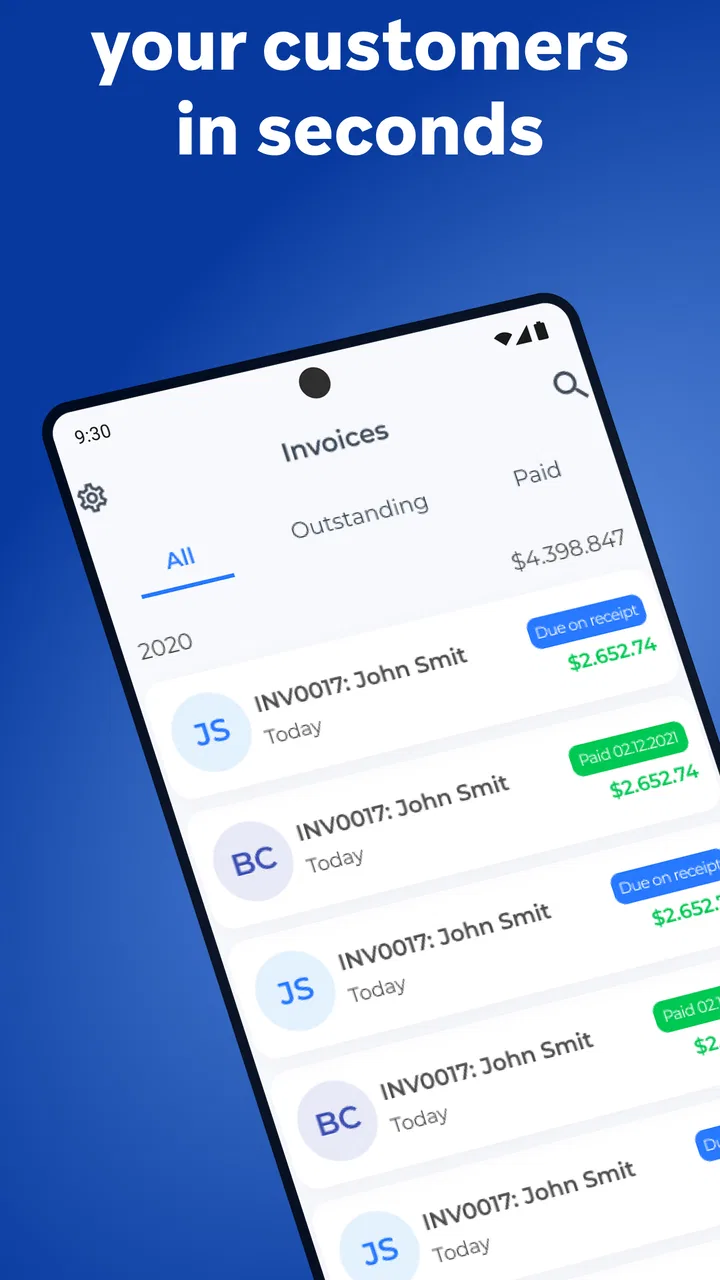
- Useful payment status tracking makes overdue invoices easier to spot.
- Cloud-based access keeps invoice information available across devices.
Cons
- Some useful features may require a paid subscription.
- Advanced accounting and tax tools are relatively limited.
- Mobile data or internet access may be needed for syncing.
- Large invoice histories can become harder to organize without filters.
- Payment processing availability may vary by country and provider.

Zintego - Invoice Maker
Gallery